« Articles
What is Porsche Connect, and How Do You Set it Up Easily?


Technology has totally changed how we connect with our cars. Driving used to be about getting from A to B, but now it’s a whole new experience—more comfortable, more convenient, and so much more in your control. That’s where Porsche Connect comes in. This system transforms your car into a smart device that syncs right up with your phone and digital world.
This guide lays out the basics with clear steps. You’ll see what it does, how to set it up, what cool things it can do, and how it fits into daily life.
What Is Porsche Connect?
It is basically a digital bridge between your car, the internet, and your phone. Suddenly, you’re managing car functions from anywhere, pulling up info you need—even while you’re on the road.
No longer stuck with just the buttons or screen in the car. The app lets you interact with your Porsche from your couch or your office. It ties together your car’s infotainment system and your online Porsche ID. Once it’s set up, your car feels like another device in your tech lineup, ready when you need it.
Why This App Matters
This isn’t just “extra tech” for the sake of it. It actually addresses stuff drivers deal with all the time.
You get:
- Faster, smarter navigation
- Real-time info when you need it
- Remote control over your car’s basics
- Extra safety and situational awareness
For a lot of people, it goes from “nice to have” to “can’t drive without it” pretty fast.
Don't Miss Out: Best Porsche Cars 2026 USA: Top 7 Luxury Models Trending Now
Core Porsche Connect Features
It stands out because it covers every part of the driving experience—before you leave, while you’re on the road, and even after you park.
1. Remote Control
Probably the feature people use most. Through this app, you can:
- Lock and unlock your car from anywhere
- Check your fuel or battery status on your phone
- Pinpoint exactly where you parked
- Get notified if anything unusual happens
It’s the kind of peace of mind you appreciate when your car isn’t in sight.
2. Smarter Navigation
No one enjoys sitting in traffic or fumbling with addresses. It steps in with real-time traffic updates and smarter routes. You can even plan out your drive on your phone, then beam the route straight to your car—no more typing when you should be driving.
3. First Mile and Last Mile Help
Ever lost track of your car in a sea of parking spaces, or struggled to find your final spot in a crowded city? This service has you covered. “First mile” guides you to your car, and “last mile” leads you from where you parked to exactly where you’re headed. It’s a little thing, but it makes a big difference.
4. Voice Control for Focused Driving
Touchscreens aren’t always your friend when you’re behind the wheel. Just speak up—It lets you use navigation, make calls, or adjust settings hands-free. That way, your eyes stay on the road, and your drive feels safer.
5. Safety and Security
You are also able to track your Porsche's position and configure alerts. There is also an in-built calling for emergencies, and roadside assistance should anything happen.
6. Digital Entertainment and Connectivity
You won’t be bored on the road. Stream your playlists, make calls, or open up your favorite apps without losing focus on driving.
7. Remote Climate Control
Hot day? Freezing morning? Adjust the cabin temperature with your phone before you even open the door. It’s a small luxury that makes a busy day a lot easier.
This app doesn’t just add features—it changes your whole relationship with your car. Suddenly, the car is just as connected and responsive as your phone or laptop, whenever you need it.
Get to Know the Porsche Connect App
This app is basically your remote control for the car. It’s simple, acts as your digital dashboard, and pretty much lets you run things from your phone.
Here’s what you can do with it:
- Check your car’s status any time you want
- Send routes straight to your car for easy navigation.
- Lock or unlock the doors and tweak settings.
- Get notifications and alerts right away.
The app’s made for everyone—whether you’re new to it or a Porsche pro, you’ll get the hang of it fast. Before long, it just becomes part of your daily routine.
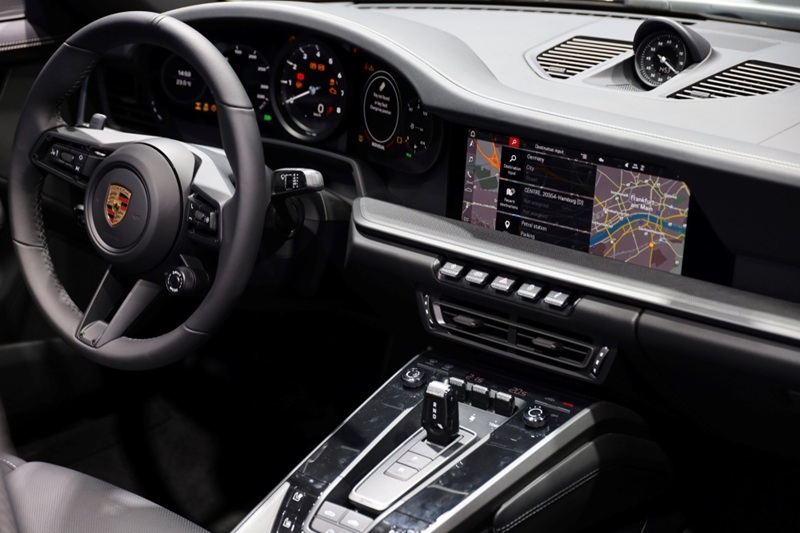
Porsche Connect Subscription: What You Need to Know
To really unlock all the features, you’ll need this app subscription. Most new cars come with a free trial, so you get a taste before committing.
When the trial’s over:
- You need to subscribe if you want access to every advanced feature.
- Prices vary—it depends on your car and which services you pick.
Basic safety stuff usually sticks around even without a subscription, but for full access, keeping your plan active matters.
Setting Up Porsche Connect
Getting everything started is pretty easy, as long as you follow each step.
- Make Your Porsche ID: Create your Porsche ID—a single account for everything. You can sign up online or use an invitation from your dealer.
- Link Your Car: Connect your car to your Porsche ID. You’ll get a pairing code to use here.
- Get Internet Connection: Your car needs internet to use the app. You can use the built-in SIM card or pop in your own. If there’s no connection, most features won’t work.
- Enter the Pairing Code: Use your car’s infotainment system to enter the pairing code. That’s how you link your car to your account and turn the services on.
- Download the App: Get the app on your phone and log in with your Porsche ID. Once you’re in, the app will sync up with your car.
- Set Your Preferences: Once everything’s set up, you can customize your notifications, navigation, and which features you want to use. That’s pretty much it—setup’s done.
How to Use Porsche Connect Day-to-Day
Knowing how to use Porsche Connect makes your life easier. Here’s how you can put it to work:
- Check your car before leaving the house.
- Send routes from your phone to the car with a tap.
- Find your car in busy parking lots.
- Keep tabs on your trips and driving stats.
- Change car settings from anywhere.
These features save time and definitely streamline your routine.
Mistakes People Make During Setup
Some common hiccups mess up the setup process:
- Skipping Porsche ID creation
- Entering the wrong pairing code
- Not getting the car’s internet set up right.
- Forgetting to activate your subscription
Double-checking these steps makes everything run smoother right from the start.
Read More: Porsche Active Suspension Management Explained For You
Is the App Worth It?
If you like convenience and smart tech, this app is a solid addition. It boosts your day-to-day driving and puts more control in your hands.
You’ll get the most out of it if you:
- Drive a lot
- Use navigation regularly
- Want remote access
- Enjoy modern features
For plenty of Porsche drivers, it becomes something they don’t want to live without.
Final Thoughts
Porsche Connect turns your car into a connected, smart system—that fits your life. You get convenience, safety, and more control, all managed easily from your phone.
Setting it up is pretty straightforward, and once you’ve got it running, those features—from remote access to real-time navigation—change the way you interact with your car every day.
FAQs
Does Porsche Connect store driving history?
Yes, this app is capable of storing and presenting your driving data, like trips, distance, and time, so that you can check your driving behavior and take trips more efficiently through the app interface.
Is a smartphone required in order to use Porsche Connect?
While a smartphone is not required for most of the car functionalities in the vehicle, the remote functionalities do require one to work. The Porsche Connect app allows you to make the best out of the available features and controls without being in the vehicle.
Is Porsche Connect available all around the world?
This app can be found in many countries, but the availability of the features depends on your location and the coverage of the service. Some services may not be available or may only be available in some areas, depending on your connection and government regulations.
Can Porsche Connect be transferred to the next owner of the vehicle?
Yes, it can be transferred to the next owner when you sell your vehicle. You need to remove your account, then the new owner will need to log in with their Porsche ID and set up the whole app again.
Featured Video
The fastest Porsche 911 ever made | Turbo S
The Porsche 911 has a turbo boost button but you only have 20 seconds...
Comment using Facebook