« Articles
Porsche Infotainment System Setup Tips & Practical Fixes


Key Takeaways
- Navigating a high-performance vehicle requires a digital command center that reacts instantly to your inputs without lagging or distracting the driver.
- Mastering the native settings prevents software glitches and keeps your smartphone connected seamlessly without suffering from constant disconnections.
- Applying the correct reset protocols instantly cures frozen screens, saving you hours of frustration and a mandatory trip to the dealership.
Buying a high-tier sports car means demanding absolute perfection from every single component, including the dashboard screen. Staring at a laggy, unresponsive digital display completely ruins the driving experience. The modern Porsche infotainment system is engineered to eliminate that frustration, operating as a seamless, high-speed command center. You cannot just turn the key and ignore the software. To extract the maximum value out of this premium interface, you must understand exactly how to customize the menus, lock down your smartphone connections, and execute instant resets when the computer freezes.
Must Read: Porsche Panamera vs BMW 7 Series: Which Luxury Sedan Wins?
What Is a Porsche Infotainment System?
It is the car’s central digital brain, built into a crisp 12.3-inch glass touchscreen right above the center console. Instead of cluttering the cabin with dozens of clunky plastic buttons, it runs your music, maps, and drive modes through clean swipeable tiles that react the millisecond your finger hits the glass.
Beyond just playing music, this system operates as the central nervous system of your vehicle. Known officially as the Porsche Communication Management (PCM) unit, it seamlessly integrates advanced navigation, climate controls, and mobile connectivity into 1 unified screen, guaranteeing you maintain complete control without ever taking your eyes off the asphalt.
Top Pick: Porsche 718 Boxster vs Spyder: Which Car is Right for You?
Top Porsche PCM Features that Car Owners Love
You do not pay a premium for basic radio functions. The native Porsche PCM features are designed to deliver elite performance and flawless daily usability.
Lightning-Fast Touch Responses
The massive 12.3-inch display reacts to your fingers instantly, eliminating the frustrating delay found in cheaper automotive screens.
Deep Menu Customization
You are not locked into a rigid layout. The system allows you to completely reorganize the main menu tiles, putting your most critical apps front and center.
Flawless Wireless Integration
It bridges the gap between your phone and the car instantly, delivering a high-tech experience without requiring you to untangle messy USB cords.
Crisp Graphical Fidelity
The interface renders deep colors and incredibly sharp icons, ensuring that all vital metrics and maps remain highly legible at a mere glance.
5 Practical Porsche Navigation System Tips
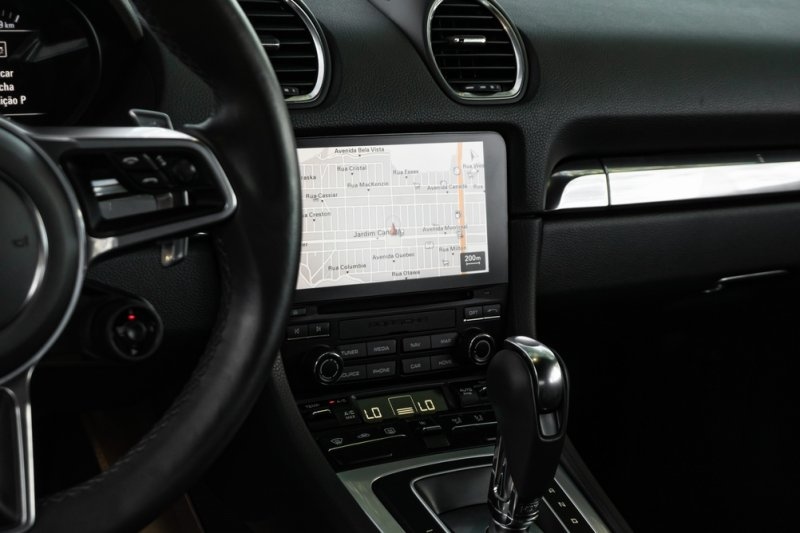
Slapping a cheap plastic phone mount on the air vent of a six-figure sports car is a complete joke. You need to master these Porsche navigation system tips to actually command your daily commute.
1. Exploit the Live Traffic Radar
Stop relying on your smartphone. The native Porsche Connect software constantly scans the highway ahead, instantly throwing up side-street detours the exact second a massive wreck gridlocks the passing lane.
2. Lock Down the Home Screen
Do not swipe through three different menus just to figure out where your exit is. Drop the live map widget right onto your main digital tile so your next turn is permanently locked into your peripheral vision.
3. Command the Voice Button
Typing an address while merging onto the freeway is asking for a crash. Hold the button on the GT Sport steering wheel, bark the street name out loud, and make the computer map the route while your hands stay glued to the leather.
4. Pre-Load Route Waypoints
Do not try to program multiple stops while moving. Lock in your entire multi-leg journey before leaving the driveway to guarantee a seamless road trip.
5. Sync with the Instrument Cluster
Push the map data directly into your digital gauge cluster, allowing you to track your exact position simply by glancing down at your steering column.
Mastering the Porsche Apple CarPlay Setup
Failing to configure this correctly results in dropped calls and missing audio. Executing a flawless Porsche Apple CarPlay setup is mandatory for smartphone users.
Voice Button Hack
Do not dig through five menus. Simply press and hold the voice control button on your steering wheel to force the PCM to instantly search for your device.
Bluetooth Prerequisite
The wireless bridge will fail if you skip the basics. You must guarantee both Wi-Fi and Bluetooth are actively broadcasting on your iPhone before initiating the connection.
Split-Screen Swipe
You do not have to choose between your music and the native car data. Swipe up or down at the bottom of the display to seamlessly toggle between full-screen and split-screen viewing.
Navigating Porsche Infotainment System Updates
Ignoring software patches guarantees your interface will eventually crash. You must stay ahead of the curve by actively managing your Porsche infotainment system updates.
Enable Automatic Cloud Sync
Force the system to do the heavy lifting. Toggle the automatic cloud sync in the settings to ensure your driver profile and system patches stay completely current.
Never Interrupt the Cycle
When the screen goes black to install a new firmware patch, do not panic and force a restart. Interrupting this delicate process guarantees massive data corruption.
Confirm OTA Network Strength
Over-the-air updates require a massive data pipeline. Only trigger a full system patch when parked in an area with absolute maximum cellular reception.
Conclusion
Driving a premium vehicle requires absolute command over its technology. You cannot afford to let a frozen screen or a dropped smartphone connection ruin a flawless drive. The modern Porsche infotainment system provides an incredible, high-speed digital experience, but it demands that you know how to operate it properly. Stop accepting default settings and dealing with frustrating software glitches.
Frequently Asked Questions
Can I play video files directly on the PCM display while the car is moving?
No. For strict safety and legal reasons, the system automatically disables all video playback the moment the transmission shifts out of park, forcing the driver to focus entirely on the road ahead.
Why does my audio sound incredibly flat when using Bluetooth streaming instead of a cable?
Wireless Bluetooth squeezes down the audio signal to send it through the air, completely stripping out the dynamic range. Plugging a certified USB cord directly into the console feeds the factory Burmester or Bose speakers a raw, uncompressed signal, bringing back the rich bass and crystal-clear highs.
Does the native navigation system require a paid monthly subscription to function?
The offline maps stay operational forever without costing an extra dime. But the second you want live congestion rerouting, satellite views, or over-the-air road updates after the three-year trial wraps up, you have to pay Porsche an annual Porsche Connect subscription fee.
Will modifying the interface with aftermarket coding void my factory warranty?
Yes. Plugging an unauthorized diagnostic scanner in to force hidden menus or alter the core software instantly flags your vehicle in the dealership computer, guaranteeing they will deny any future electrical warranty claims.
How do I completely wipe my personal data from the system before selling the vehicle?
Navigate directly into the primary system settings and select the master factory reset option. This permanently wipes your home address, synced contacts, stored passwords, and linked mobile devices, restoring the software to a completely blank slate.
Featured Video
The fastest Porsche 911 ever made | Turbo S
The Porsche 911 has a turbo boost button but you only have 20 seconds...
Comment using Facebook